Child-friendly

Check your child’s food for additives

Scan the barcode with Bite Insight, a free app for UK supermarket food, and get an Additives rating from Low to Very High. Add Child-Friendly to your profile and the six colours linked to hyperactivity count the most, along with the preservatives sodium benzoate and calcium propionate. Sweeteners, caffeine and added sugar get flagged in the ingredients too.

Some colours in children’s food
come with a warning label

Since 2010, UK food and drink that contains any of six artificial colours has had to carry a warning about children’s activity and attention. Many big brands have taken them out, but you can still find them. The warning sits in small print on the back, and most other additives parents ask about don’t come with one at all.

0
artificial colours need a warning on the pack

Sunset yellow (E110), quinoline yellow (E104), carmoisine (E122), allura red (E129), tartrazine (E102) and ponceau 4R (E124). UK food additives law sets the wording the label has to use.

0
children took part in the Southampton study

153 three-year-olds and 144 eight-year-olds had drinks with mixes of these colours and the preservative sodium benzoate. Some became more hyperactive. The Food Standards Agency funded it, and it was published in The Lancet in 2007.

0
of free sugars a day is the NHS limit for children aged 4 to 6

It’s 24g for 7 to 10 year olds and 30g from 11. The NHS sets salt limits by age too: 3g a day from 4 to 6, and 5g from 7 to 10.

Quick guide

How to check children’s food for additives at the supermarket

Additives are listed in the ingredients on the back of every UK pack, with their job first and then a name or E number, like “colour: sunset yellow”. If one of the six colours is in there, a warning has to be printed on the label as well. You can let the app read the list for you, or check it yourself.

With Bite Insight

Let the app read the ingredients

  1. Add Child-Friendly to your profile

    It’s under diets and lifestyles, called Child-Friendly / Additive-Free. Add it to your own profile and every scan is checked for it, free. With Bite Insight+ each child can have a profile of their own, and every scan is checked against the whole family at once.

  2. Scan the barcode

    You get an Additives rating first and a Sugar rating next to it. The six colours count the most, along with the preservatives sodium benzoate (E211) and calcium propionate (E282). Under Flagged ingredients you’ll see those plus sweeteners, caffeine, added sugar, salt and hydrogenated fats.

Scan your first product free
Your additives rating
  • Low
  • Moderate
  • High
  • Very High

Rated from the additives in the ingredients list. Lower is better.

Checking the pack yourself

Four checks on the back of the pack

Look for the colour warning

If a food or drink contains any of the six colours, the label has to name the colour and say it “may have an adverse effect on activity and attention in children”. It’s usually printed near the ingredients, not on the front.

Read the colour names

Lots of colours come from plants, such as paprika extract, beetroot red or curcumin. The six to look for are E102, E104, E110, E122, E124 and E129, or their names. The preservative sodium benzoate (E211) was in the Southampton study drinks too.

Check drinks for caffeine

A drink with more than 150mg of caffeine per litre has to say “High caffeine content. Not recommended for children or pregnant or breast-feeding women”. Cola can have caffeine below that level, so look for caffeine in the ingredients as well.

Compare the sugar

More than 22.5g of total sugars per 100g is high and 5g or less is low. If a drink says “with sweeteners” by its name, some of the sugar has been swapped for sweeteners. Those have passed safety checks, but some parents still prefer to keep them down.

Additives aren’t the whole story

The Southampton study found an effect in some children, not all of them. The Food Standards Agency says being careful about what a child eats may help with hyperactive behaviour but may not stop it. If you’re worried about your child’s behaviour, or think a food doesn’t agree with them, talk to your GP or health visitor before cutting foods out.

Where additives show up on a UK label

Colour warning

Where to find it
Near the ingredients list, on the back or side
What to look for
A colour named, then a line about activity and attention in children.

Colours and preservatives

Where to find it
Ingredients list
What to look for
E102, E104, E110, E122, E124, E129, and sodium benzoate (E211).

Caffeine

Where to find it
Next to the drink’s name, and in the ingredients
What to look for
“High caffeine content”, or coffee, guarana and tea extract in the list.

“With sweeteners”

Where to find it
Next to the product name
What to look for
It means sweeteners like aspartame, acesulfame K or sucralose are in it.

Sugars per 100g

Where to find it
Nutrition table, on the “of which sugars” line
What to look for
Over 22.5g is high. 5g or less is low.

Salt per 100g

Where to find it
Nutrition table
What to look for
Over 1.5g is high. 0.3g or less is low. Children need less salt than adults.
Under the hood

How Bite Insight works this out

The Additives rating reads the ingredients list and picks out every E number. With Child-Friendly in your profile, some count for more. The six colours, sodium benzoate (E211) and calcium propionate (E282) are treated as high concern: one makes the rating High and two make it Very High. A second group counts as moderate concern. It includes other artificial colours like brilliant blue (E133), potassium benzoate (E212), nitrites, MSG and the sweeteners aspartame, acesulfame K, sucralose and saccharin. One of those makes it Moderate and two make it High. If there are none from either group, five or more E numbers is Moderate and fewer is Low. The Sugar rating uses sugars per 100g: 5g or less is Low, up to 12.5g is Moderate, up to 22.5g is High and anything over is Very High. The ingredient flags are a separate check, and each one found is marked as harmful for Child-Friendly.

Bite Insight gives general food information, not medical advice. The Additives rating is the app’s own guide, worked out from the ingredients list. Every additive used in UK food has been approved as safe for its use. If you’re concerned about your child’s diet or behaviour, your GP or health visitor can help.

Built around your family

Bite Insight doesn’t give everyone the same results. Add Child-Friendly to a profile once and every scan puts the additives first.

Additives Very High

Additives rating

Every scan shows an Additives rating from Low to Very High, with the six colours counting most. It’s the first thing you see under the profile.

Per 100ml
Sugars
9g / 100ml Moderate
Salt
0.02g / 100ml Low

Sugar and salt in plain sight

Child-Friendly also turns on a Sugar rating. The Nutrition tab shows sugar and salt against the same high and low lines as UK front-of-pack labels, and salty ingredients are flagged on every scan.

Flag feature preview, decorative

Flag ingredients you want to avoid

plus

Colours, sweeteners and caffeine are already flagged for free. With Bite Insight+ you can add anything else, like gelatine or a fruit your child won’t touch, and it gets picked out on every scan.

Feature spotlight

See which additives are in a product at a glance

The Additives rating reads the ingredients list on each product and rates it from Low to Very High. The colours and preservatives from the Southampton study count most. A quick way to compare two drinks or two packs of sweets.

Low Fewer than five E numbers, none of concern
Moderate One moderate-concern additive, like a sweetener, or five or more E numbers
High One high-concern additive, or two moderate ones
Very High Two or more high-concern additives, like a colour from the six plus sodium benzoate
Additives rating icon at Very High

From scan to confidence in seconds

No more hunting for E numbers in small print with a toddler in the trolley.

Scanning a food product barcode with a smartphone

Scan the barcode

Point your camera at the barcode, in the supermarket or at home. Or search for the product by name.

Bite Insight app showing a personalised additives rating

Get your insights

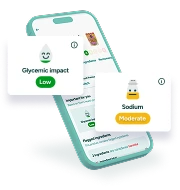
Bite Insight checks the product against your Child-Friendly profile and shows what matters. The Additives and Sugar ratings, any colours, sweeteners or caffeine, and anything on your own avoid list.

A bowl of salad

Shop with confidence

Put the snacks and drinks you’re happy with in the trolley without reading every label twice.

Where you shop

Use it in the supermarkets you already go to

Bite Insight works with food from the big UK supermarkets, own-brand ranges included. If you shop in the UK, pick your supermarket in the app and swaps from that shop are shown first.

  • Tesco
  • Sainsbury’s
  • Asda
  • Morrisons
  • Aldi
  • Lidl
  • Waitrose
  • Co-op
  • M&S

Bite Insight isn’t linked to any of these supermarkets.

Start free. Upgrade when you’re ready.

The tools for checking additives while you shop are free. Additives and Sugar ratings, ingredient flags and the full nutrition table on every scan.

Select a version

Everything you need to spot the colours, sweeteners and caffeine while you shop.

Bite Insight includes

Additives rating Low, Moderate, High, Very High

Personalised warnings based on your Child-Friendly profile

Full nutrition breakdown including sugar and salt on every scan

200,000+ UK food and drink products

Free

No subscription or payment details required.

Get the free app

Extra tools for families, including a profile for each child.

Bite Insight+ includes

Flag anything else your child should skip
Family profiles so you can scan for others too
Global barcode scanning
Access to over 4.9 million products worldwide
Plan your meals for the week with the meal planner
Plus everything in the Free version
£3.99/ month

Subscription renews automatically. Cancel anytime.

Upgrade to Bite Insight+

Common questions

About using Bite Insight to check children’s food for additives.

Yes. Bite Insight is a free app that scans UK supermarket food and gives it an Additives rating from Low to Very High. Add Child-Friendly to your profile and the six colours linked to hyperactivity count the most, and sweeteners, caffeine, added sugar and salt get flagged in the ingredients. There’s no scan limit on the free version.

They’re six artificial colours tested in a 2007 University of Southampton study funded by the Food Standards Agency: sunset yellow (E110), quinoline yellow (E104), carmoisine (E122), allura red (E129), tartrazine (E102) and ponceau 4R (E124). Mixes of them, given with the preservative sodium benzoate, made some children more hyperactive. Since 2010 any food or drink containing one has needed a warning label.

It means the product contains at least one of the six colours. The label has to name the colour and say it “may have an adverse effect on activity and attention in children”. The colours are still legal. The warning is there so parents can choose. It doesn’t apply to drinks with more than 1.2% alcohol.

It reads the E numbers in the ingredients. The six colours, sodium benzoate (E211) and calcium propionate (E282) are high concern: one makes it High, two make it Very High. Other artificial colours, sweeteners, MSG, nitrites and a few preservatives are moderate concern: one makes it Moderate, two make it High. Otherwise five or more E numbers is Moderate and fewer is Low.

Chocolate and cocoa contain small amounts of caffeine, so they’re flagged along with coffee, guarana and tea extract. A flag means “worth a look”, not “never”. You can decide how much it matters for your child.

Yes, with Bite Insight+ at £3.99 a month. Each child gets their own profile, with their own diets, allergies and flagged ingredients, and every scan is checked against the whole family at once. If you add Child-Friendly to your own profile instead, the ratings and flags are free.

Sweeteners have to pass safety checks before they’re allowed in UK food. People with phenylketonuria (PKU) need to avoid aspartame, which is why labels say when a product contains a source of phenylalanine. Some parents still prefer to limit sweeteners, so the app flags aspartame, acesulfame K, sucralose and saccharin for Child-Friendly.

No. Bite Insight gives food information to help you choose in the shop. It isn’t a substitute for advice from your GP, health visitor or a dietitian. If you think a food affects your child, or you’re thinking of cutting foods out of their diet, talk to them first.